Long time no read, fellow internauts!
Early this morning, I couldn't go back to sleep, so I decided to do a post on how I embellished one of my 3D prototypes.
I use Godot version 3.6 with the GLES2 renderer, mostly because it's nice and small and will run on most GPUs of this century. Godot has good resources on performance and the most useful here is the article about faking global illumination. But this can apply to other engines, Raylib, Defold etc.
I will use this low-poly scene with Super Note in it (before/after):
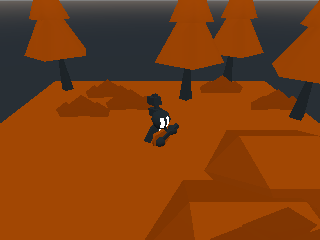
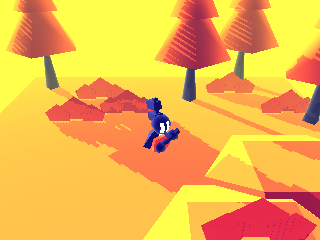
There are no expensive effects, not even glow/bloom or indirect lighting. Also there are only 3 materials here (dark gray, red-orange, and white on Super Note).
The cheap tools
- Blue ambient light: shadows shouldn't be completely dark, because it doesn't look very good, and your game usually has more important elements than the shadows. I chose blue because as a "dark" color, it looks nice for any accent color.
- A low sun: directional light grazing the floor. Who doesn't like sunsets? Notice how the shadows aren't 100% opaque, this is to fake indirect lighting. Shadows look a bit blocky here: this is for optimization + the semi-accidental hatch-line effects on the trees.
- Tonemapping, or the art of messing with color balance. Here I turned "black" into "dark blue", I used a cubic gradient instead of a linear one, and I brought black a tiny bit higher to improve contrast. Godot calls this option "Adjustments"/"Color correction". Same idea as the blue ambient light, but more powerful.
- Rim lighting: in my opinion, that's a big difference for popping out shapes. Thanks, Super Mario Galaxy. You can do rim lighting with a directional light that always faces the camera and doesn't cast shadows. In Godot, that means this light should be a child of the camera node.
- Fog: it also helps with recognizing shapes, but on a more global level (atmospheric perspective). Also here it looks nice in yellow (contrast with blue ambient light).
- Decreasing the Field of view (FOV): it helps with the "cute" aspect and the legibility of a top-down game. Godot has a default FOV of 75 degrees, here I set it to 45. I didn't go all the way to an orthogonal camera, you might as well do a 2D game in that case.
For indoor scenes, I don't use rim lighting, sunlight, and fog is a bit different. To fake indirect lighting in a "ray of light piercing darkness" way, I sometimes put an omni light just above the lit surface.
In this scene I also removed specular lighting (bright shiny spots). For a wooden, arts&crafts vibe, it works. Don't try to copy the latest Paper Mario dev team who uses a million visual effects.
By the way, I don't use Blender or anything, I make all my models in Godot with CSG nodes. It's faster and simpler, as long as you don't do texturing/UV-mapping. For performance-critical meshes, I export them to GLTF, so I stay in Godot.
Going further
Project files are available here: Super Note smol 3D scene. It's only 3 kB, somehow I had a lot of fun optimizing it, even though it's pointless since Godot itself is a few MB.
If you really want your game to look like a diorama, you can decrease the FOV even lower and add a depth-of-field effect, which blurs near and far objects (a bit expensive but works really well). Even 2D games can do it, like Hollow Knight.
Hmm, as I type this, it just so happens that the sun is rising outside. Good job on this 3D scene, reality!
News on this website
I don't post regularly anymore, but I still have a few drafts left. No progress on the "digital garden conversion project", but hey, web pages don't expire, I have time.
Thank you for reading this assemblage of words. On that, remember to take care of your polygons and see ya in the next one!